Find energy waste automatically.
Know why - Fix it fast.
The Ento Advisor continuously monitors your entire building portfolio and tells you not just that something is wrong, but where to look and what to do about it.
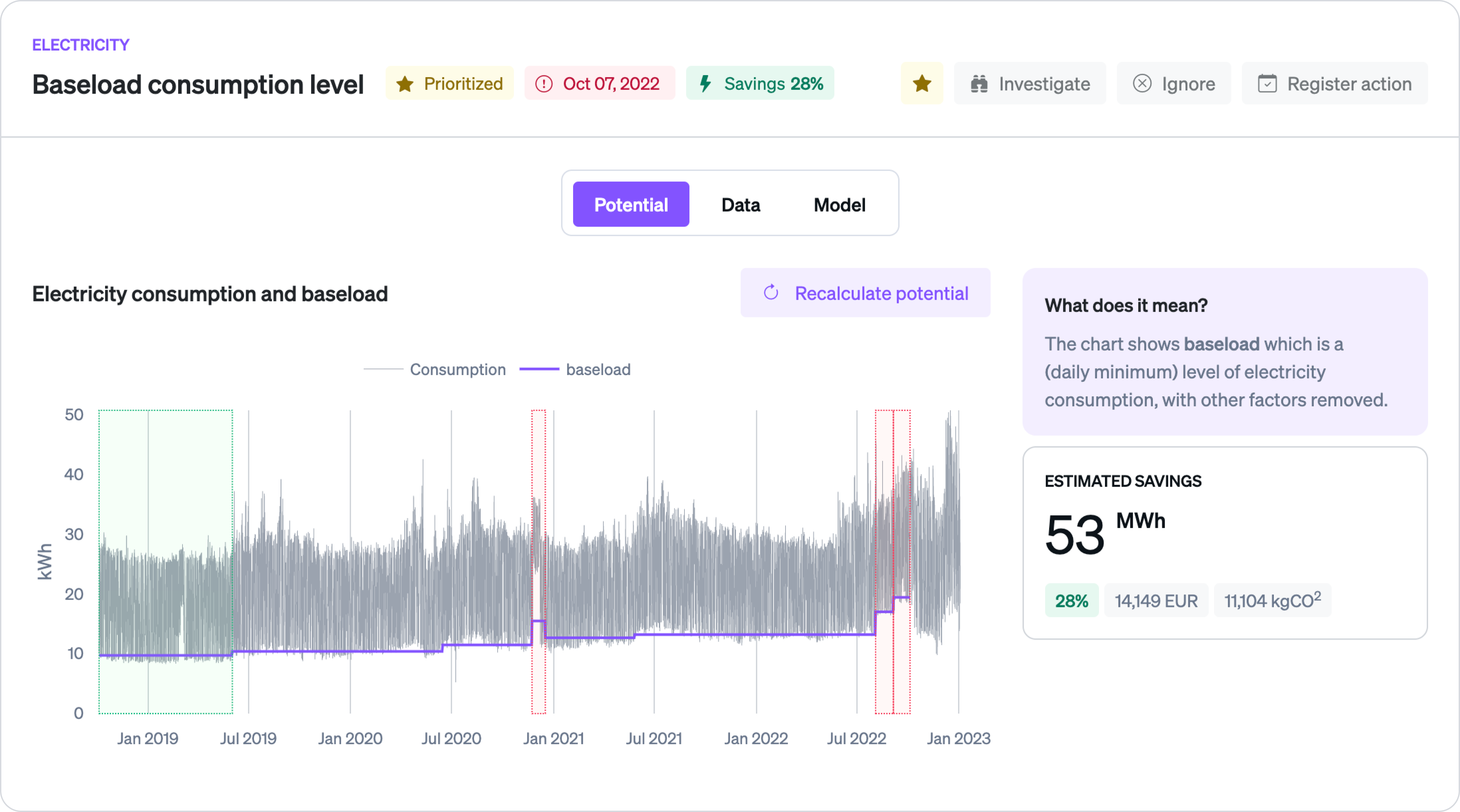
Works directly from your utility meter data
When submeters are useful, we'll tell you. But in most cases, you won't need them — and you'll still get better answers than platforms that do.
Smarter alerts with built-in
root cause analysis
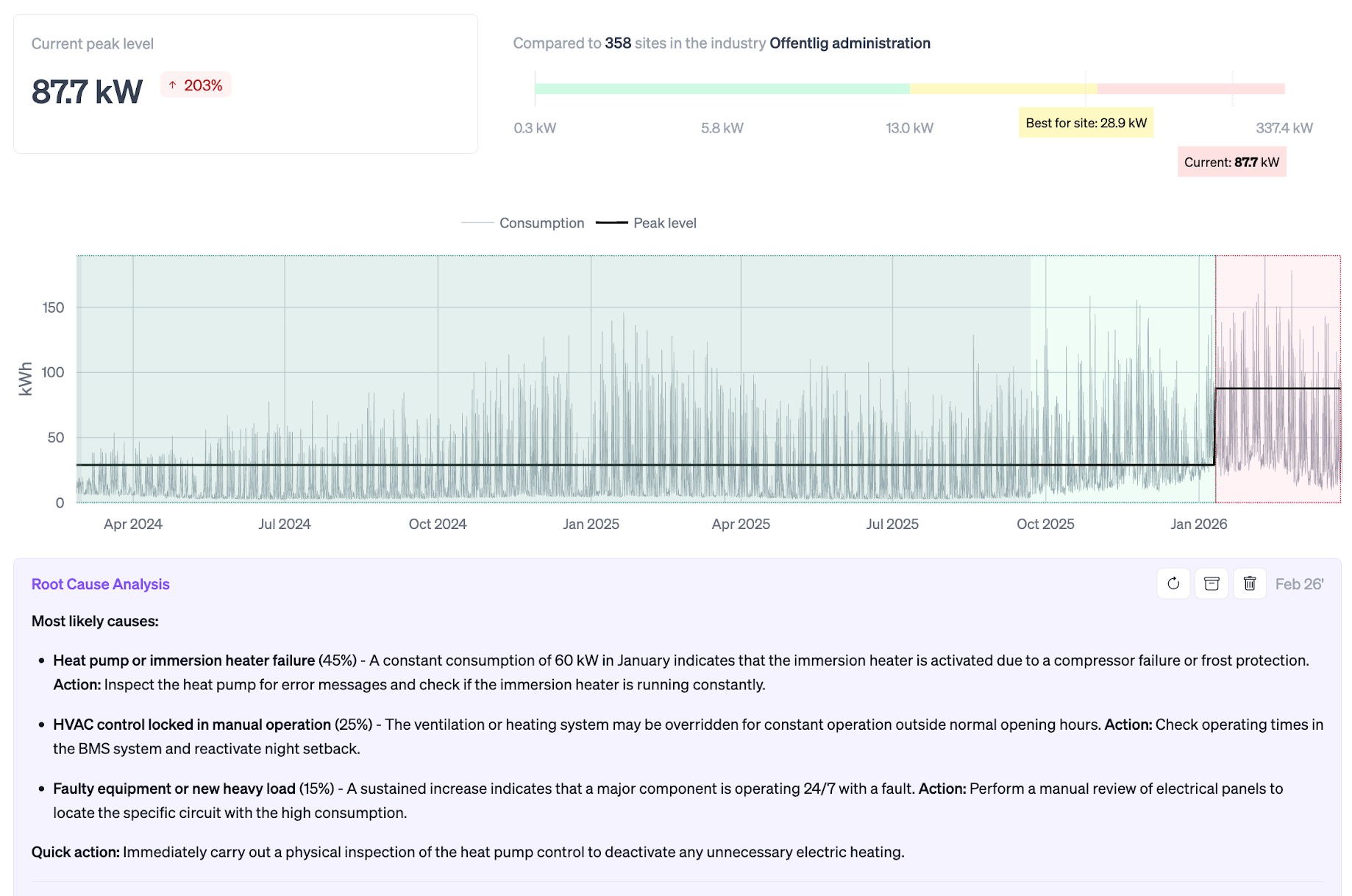
Every alert includes AI-ranked root cause hypotheses and actionable next steps. Designed for mobile, technicians can review issues, log findings, and use our conversational interface directly from the field — eliminating office back-and-forth and speeding up fixes.
Coverage across every energy type
Purpose-built detection models for each energy source — not generic anomaly detection,
but building-aware intelligence that understands how each system actually behaves.
How our digital advisor helps building owners lower their energy consumption
We help businesses and public institutions use energy in an efficient and sustainable way. In many cases without any large investments.

.png)
We work with climate ambitious
organisations to do even better







Start saving energy
- Discover hidden savings potential in your buildings
- Turn complex energy data into clear, actionable insights
- Measure impact and prove results with real-time reporting




%20(1).png)





%20(1).png)

Still got questions?
Which energy types does the Advisor cover?
The Advisor includes purpose-built detection models for electricity, gas, district heating, water, and solar PV. Each one is designed around how that energy type actually behaves in buildings — not a generic anomaly detector applied across the board.
Electricity tracks baseload deviations and HVAC-driven consumption. Gas and district heating understand your building's thermal profile and flag when it's heating wrong — including penalty calculations for district heating contracts. Water monitors for leaks and overnight consumption. Solar tracks inverter performance and panel output against expected production curves.
You can start with one energy type and expand as you connect more data sources.
Do I need to install any hardware or sensors to get started?
No. Ento connects directly to your utility meter data through APIs and data hubs — no new hardware, sensors, or on-site installation required. You get full portfolio visibility from day one using the consumption data you're already paying for. If you want to go deeper later (e.g., indoor climate sensors or BMS integration), you can layer those in over time, but they're never a prerequisite.
How do you know your alerts are real and not false positives?
Every alert is generated by machine learning models that normalize for weather, calendar patterns, holidays, and occupancy — so you're only flagged when consumption genuinely deviates from what's expected. Each alert comes with an estimated energy and cost impact, AI-generated root cause suggestions with probability scores, and clear investigation steps. The result is fewer, more meaningful alerts that point to real waste — not noise.
How does root cause analysis work?
When the Advisor detects an anomaly, it also generates a ranked list of likely causes based on the building's consumption patterns, available building data, and known failure modes for that energy type. Each hypothesis comes with a probability score and specific investigation steps.
Technicians can review these directly from their phone in the field, log findings, and close the alert without needing to go back and forth with an office. This allows you to get from symptom to fix without the manual analysis work in between.
What happens after I get an alert?
The alert shows you the anomaly, the estimated cost impact, and the AI-generated root cause hypotheses with investigation steps. From there, you can assign it to a technician (via email with full context attached), investigate further on the platform, leave comments for other energy managers to see, or mark it as irrelevant if you already know the cause.
Technicians get everything they need on mobile — the alert, the root cause suggestions, and a place to log what they found. Once the issue is resolved, an energy efficiency project can be registered, and our platform will automatically verify the savings over time.
What does the Advisor tell me about potential savings?
Every alert includes an estimated energy and cost impact — so you can immediately see whether you're looking at a €500 issue or a €50,000 one. Our platform automatically prioritizes your portfolio by impact, so you're always working on the highest-value problems first.
The Advisor's role is to surface waste before it becomes permanent, and to give you enough confidence in the underlying root-cause to act quickly.
How quickly will Ento pay for itself?
Most customers see payback within three to six months. Because Ento pinpoints the highest-impact waste across your portfolio — and prioritizes the top 10% of sites driving 80% of savings — it's common for a single fix identified by the platform to cover the cost of your subscription.
We already have an EMS — why would we add Ento?
Traditional EMS platforms are great at collecting data and showing dashboards, but most leave the hard part to you: figuring out what to act on, when, and proving it worked. Ento sits on top of your existing infrastructure and turns that data into prioritized, actionable insights. It tells you which buildings to focus on first, what's likely causing the waste, and — once you've acted — verifies the savings automatically. Think of it as the intelligence layer that makes your current EMS investment work harder.